
Professional Certificate in Advanced Image Editing for Screenshots
Elevate your screenshot editing skills with this certificate, enhancing images professionally for optimal visual communication and presentation.
Professional Certificate in Advanced Image Editing for Screenshots
Programme Overview
The Professional Certificate in Advanced Image Editing for Screenshots is designed for professionals and advanced learners who require a deep understanding of image editing techniques specifically tailored for enhancing and modifying screenshots. This program is ideal for software developers, graphic designers, marketers, and content creators who need to produce high-quality visual content for digital platforms. Participants will learn to manipulate and optimize screenshots to meet various project requirements, from basic cropping and color correction to advanced techniques such as layer manipulation, opacity adjustments, and incorporating annotations and text overlays.
Key skills and knowledge developed in this program include proficiency in using professional image editing software, such as Adobe Photoshop and GIMP, for detailed image editing tasks. Learners will master techniques for capturing, enhancing, and refining screenshots to ensure they are visually appealing and informative. The curriculum also covers the importance of resolution, color profiles, and file formats, ensuring that images are optimized for web and print. Additionally, participants will learn how to add and manipulate annotations, text, and other elements to effectively communicate data or highlight key features.
The career impact of this program is significant, as graduates will be well-equipped to advance in their roles or transition into specialized positions that require advanced image editing skills. They will be able to deliver superior visual content for a variety of projects, including product demonstrations, user guides, marketing campaigns, and technical documentation. This certificate not only enhances their professional capability but also positions them as experts in generating high-quality digital assets that can significantly improve user engagement and satisfaction.
What You'll Learn
The 'Professional Certificate in Advanced Image Editing for Screenshots' is an intensive, hands-on program designed to equip professionals with the skills necessary to enhance, manipulate, and optimize screenshots for various digital platforms. This program delves into advanced techniques using industry-standard software like Adobe Photoshop and GIMP, focusing on color correction, image retouching, and enhancing visual clarity.
Participants will learn how to prepare screenshots for online galleries, social media, and technical documentation, ensuring they meet the highest standards for visual communication. By mastering these skills, graduates will be able to create compelling visual content that effectively communicates complex information, improves user engagement, and enhances the overall user experience.
Upon completion, graduates can apply their expertise to career opportunities in web design, user experience (UX) design, technical writing, and digital marketing. They will be well-prepared to refine website graphics, create detailed product images, and enhance documentation, making them valuable assets to any digital or tech-oriented organization. This program not only provides a strong foundation in image editing but also offers practical experience that can be immediately applied in professional settings.
Programme Highlights
Industry-Aligned Curriculum
Developed with industry leaders for job-ready skills
Globally Recognised Certificate
Recognised by employers across 180+ countries
Flexible Online Learning
Study at your own pace with lifetime access
Instant Access
Start learning immediately, no application process
Constantly Updated Content
Latest industry trends and best practices
Career Advancement
87% report measurable career progression within 6 months
Topics Covered
- Introduction to Advanced Image Editing: Provides an overview of the course and essential tools.: Image Optimization Techniques: Focuses on enhancing image quality and reducing file size.
- Color Correction and Calibration: Teaches how to adjust and match colors accurately.: Advanced Cropping and Composition: Explores techniques for refining image composition.
- Text and Annotation Tools: Covers the use of text and annotations for explanations and highlights.: Exporting and Sharing Best Practices: Discusses effective methods for exporting and sharing edited images.
Everything Included in Your Enrolment
Here is what you get when you enrol with LSBR London
Key Facts
For professionals in design, marketing, and tech fields
Basic knowledge of image editing software
Proficient in advanced screenshot editing techniques
Enhanced image quality for digital presentations
Ability to create professional visual content
Understanding of color theory and design principles
Ready to advance your career?
Join thousands of professionals who have transformed their careers with LSBR London. Enrol today and start learning immediately.
Why This Course
Enhance Professional Skills: Earning a Professional Certificate in Advanced Image Editing for Screenshots equips professionals with advanced techniques in image editing software, such as Adobe Photoshop and Lightroom. This not only improves their ability to create high-quality visual content but also enables them to manipulate and enhance screenshots effectively, making their work more visually appealing and impactful.
Career Advancement: By mastering advanced image editing skills, professionals can take on more complex projects and responsibilities. This certificate can be a significant differentiator in the job market, as it demonstrates a commitment to professional development and expertise in handling visual content, which is increasingly crucial in digital marketing, web design, and technical documentation roles.
Improved Client Satisfaction: Advanced image editing skills allow professionals to deliver high-quality visual content that better meets client expectations. This leads to increased client satisfaction and a stronger reputation, as clients appreciate the enhanced visual presentation of their projects. This can open up new opportunities for collaborations and client referrals, thereby boosting career growth.
"This programme gave me the confidence and credentials to secure a senior role. Highly recommend LSBR London."
— Sarah M., United Kingdom
Course Brochure
Download our comprehensive course brochure with all details
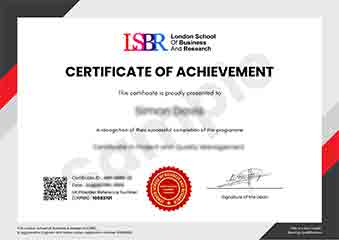
Sample Certificate
Preview the certificate you'll receive upon successful completion of this program.
Get Course Info
Receive the full course guide, pricing details, and enrolment instructions directly in your inbox.
Check your inbox!
Course details have been sent to your email.
Get Your Employer to Sponsor This Programme
Many employers offer professional development budgets. We make it easy for your company to invest in your growth with corporate invoicing and bulk enrolment options.
Email Template for Your Manager
Dear [Manager's Name],
I would like to request sponsorship for the Professional Certificate in Advanced Image Editing for Screenshots programme offered by LSBR London - Executive Education.
The programme costs $149 (one-time) and can be completed in 3-4 weeks alongside my regular duties.
Key benefits to our team:
- Immediately applicable skills
- Globally recognised certificate
- Corporate invoice available
Best regards,
[Your Name]
What People Say About Us
Hear from our students about their experience with the Professional Certificate in Advanced Image Editing for Screenshots at LSBR London - Executive Education.
Charlotte Williams
United Kingdom"The course content is incredibly thorough, covering everything from basic editing techniques to advanced color correction and optimization for web use. Gaining these skills has significantly enhanced my ability to produce high-quality screenshots for presentations and reports, making a noticeable difference in my professional work."
Zoe Williams
Australia"This course has been instrumental in enhancing my ability to create high-quality screenshots for presentations and documentation, making my work stand out in the tech industry. It has not only improved my technical skills but also opened up new opportunities for me to take on more complex projects at work."
Priya Sharma
India"The course structure is well-organized, providing a clear path from basic techniques to advanced editing skills, which has significantly enhanced my ability to create professional-looking screenshots for presentations and reports. The comprehensive content and real-world applications have been invaluable for my professional growth, offering practical insights that I can immediately apply in my work."
Your Path to Certification
Four simple steps from enrolment to your globally recognised certificate
Enrol Online
Complete your enrolment in under 2 minutes with secure checkout
Start Learning
Get instant access to all course materials and start at your own pace
Complete Modules
Work through the curriculum with expert support available throughout
Get Certified
Receive your LSBR London certificate recognised across 180+ countries
LSBR London by the Numbers
Join a global community of professionals advancing their careers
Students Enrolled
Countries Represented
Average Rating
Career Progression
Join Thousands Who Transformed Their Careers
Our graduates consistently report measurable career growth and professional advancement after completing their programmes.
Still deciding?
Join 23,000+ professionals who advanced their careers. Enroll today and start learning immediately.
Enroll NowSecure payment • Instant access • Certificate included