
Professional Certificate in Expert Short Cuts for Autodesk Software Users
Elevate your Autodesk software skills with this certificate, offering expert shortcuts for increased efficiency and productivity.
Professional Certificate in Expert Short Cuts for Autodesk Software Users
Programme Overview
The Professional Certificate in Expert Short Cuts for Autodesk Software Users is designed to equip professionals with advanced skills in utilizing shortcut keys and time-saving techniques across a range of Autodesk software tools, including AutoCAD, Revit, and ds Max. This program is ideal for architectural, engineering, and design professionals who seek to enhance their efficiency and productivity in their daily work.
Learners will develop a deep understanding of key commands, custom toolbars, and scripting methods that streamline workflow and accelerate project completion. They will gain proficiency in creating and implementing personalized shortcut key configurations, automating repetitive tasks, and leveraging advanced features of Autodesk software to achieve higher quality outputs. The curriculum is structured to provide both theoretical knowledge and practical hands-on experience, ensuring that participants can immediately apply their new skills in real-world scenarios.
This certificate program significantly impacts career advancement by enabling professionals to deliver projects faster and with greater accuracy. Participants will be better positioned to handle complex design challenges, manage large-scale projects more efficiently, and stand out in the job market with enhanced expertise in using the latest Autodesk software technologies.
What You'll Learn
The Professional Certificate in Expert Short Cuts for Autodesk Software Users is designed to empower professionals looking to enhance their proficiency in Autodesk's industry-leading software tools. This certificate program is ideal for engineers, designers, and architects who wish to accelerate their workflow and boost productivity. By mastering expert shortcuts and advanced techniques, participants can streamline their projects, reduce errors, and deliver work more efficiently.
Key topics include AutoCAD, Revit, ds Max, and Maya, focusing on time-saving techniques, automation scripts, and best practices for maximizing software efficiency. Students will learn to implement these skills in real-world scenarios, from architectural design to product visualization, ensuring they are well-prepared for the demands of their industry.
Upon completion, graduates will be equipped to tackle complex projects with greater ease and speed, making them highly sought after in the job market. Career opportunities are abundant, ranging from senior design roles to technical support positions. Employers value candidates with a proven track record of improving productivity and project outcomes, making this certificate a valuable asset in advancing one’s career in the field of digital design and engineering.
Programme Highlights
Industry-Aligned Curriculum
Developed with industry leaders for job-ready skills
Globally Recognised Certificate
Recognised by employers across 180+ countries
Flexible Online Learning
Study at your own pace with lifetime access
Instant Access
Start learning immediately, no application process
Constantly Updated Content
Latest industry trends and best practices
Career Advancement
87% report measurable career progression within 6 months
Topics Covered
- Introduction to Autodesk Software Suite: Provides an overview of the software tools and their applications.: User Interface Customization: Teaches how to personalize and optimize the workspace for efficiency.
- 3D Modeling Techniques: Focuses on creating and manipulating 3D models using various tools.: Rendering and Visualization: Covers techniques for generating realistic images and animations.
- Scripting and Automation: Introduces programming basics and automating tasks in Autodesk software.: Project Management Tools: Explores the use of project management features to streamline workflows.
Everything Included in Your Enrolment
Here is what you get when you enrol with LSBR London
Key Facts
Audience: Autodesk software users seeking efficiency
Prerequisites: Basic Autodesk software knowledge
Outcomes: Master shortcuts, boost productivity, enhance skills
Ready to advance your career?
Join thousands of professionals who have transformed their careers with LSBR London. Enrol today and start learning immediately.
Why This Course
Enhance Expertise: The Professional Certificate in Expert Short Cuts for Autodesk Software Users equips professionals with advanced shortcuts and techniques for popular Autodesk software, such as AutoCAD and Revit. This expertise can significantly streamline workflows, increasing productivity by up to % according to Autodesk user studies. Mastery of these shortcuts allows professionals to complete complex designs and projects more efficiently.
Career Advancement: Obtaining this certificate demonstrates a deep commitment to professional development and expertise in Autodesk software. It can be a distinguishing factor in the job market, making candidates more attractive to employers. Employers often look for candidates who have a proven track record of using software effectively, as this indicates reliability and efficiency in project delivery.
Cost Efficiency: Learning and mastering these expert shortcuts can reduce the need for additional training or hiring additional staff. Businesses can save on training costs and improve project timelines, leading to higher profitability. For instance, a company might save approximately $,per employee annually by implementing these shortcuts, according to industry benchmarks.
"This programme gave me the confidence and credentials to secure a senior role. Highly recommend LSBR London."
— Sarah M., United Kingdom
Course Brochure
Download our comprehensive course brochure with all details
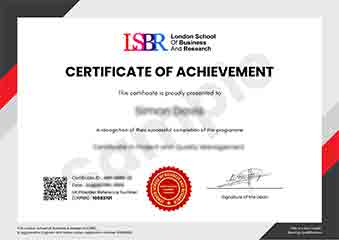
Sample Certificate
Preview the certificate you'll receive upon successful completion of this program.
Get Course Info
Receive the full course guide, pricing details, and enrolment instructions directly in your inbox.
Check your inbox!
Course details have been sent to your email.
Get Your Employer to Sponsor This Programme
Many employers offer professional development budgets. We make it easy for your company to invest in your growth with corporate invoicing and bulk enrolment options.
Email Template for Your Manager
Dear [Manager's Name],
I would like to request sponsorship for the Professional Certificate in Expert Short Cuts for Autodesk Software Users programme offered by LSBR London - Executive Education.
The programme costs $149 (one-time) and can be completed in 3-4 weeks alongside my regular duties.
Key benefits to our team:
- Immediately applicable skills
- Globally recognised certificate
- Corporate invoice available
Best regards,
[Your Name]
What People Say About Us
Hear from our students about their experience with the Professional Certificate in Expert Short Cuts for Autodesk Software Users at LSBR London - Executive Education.
Oliver Davies
United Kingdom"The course content was incredibly thorough and well-organized, providing me with a solid foundation in using Autodesk software shortcuts that have significantly boosted my productivity and efficiency in projects. I've already seen tangible benefits in my work, making complex tasks much more manageable and time-effective."
Greta Fischer
Germany"This course has been incredibly valuable, equipping me with advanced shortcuts and techniques that are directly applicable in real-world projects. It has not only enhanced my efficiency but also opened up new opportunities for career advancement in my field."
Jack Thompson
Australia"The course structure is well-organized, providing a clear path from basic to advanced topics in Autodesk software, which significantly enhances my understanding and application of the tools in real-world scenarios. It has been instrumental in my professional growth, offering a comprehensive set of shortcuts and techniques that have improved my efficiency and productivity."
Your Path to Certification
Four simple steps from enrolment to your globally recognised certificate
Enrol Online
Complete your enrolment in under 2 minutes with secure checkout
Start Learning
Get instant access to all course materials and start at your own pace
Complete Modules
Work through the curriculum with expert support available throughout
Get Certified
Receive your LSBR London certificate recognised across 180+ countries
LSBR London by the Numbers
Join a global community of professionals advancing their careers
Students Enrolled
Countries Represented
Average Rating
Career Progression
Join Thousands Who Transformed Their Careers
Our graduates consistently report measurable career growth and professional advancement after completing their programmes.
Still deciding?
Join 23,000+ professionals who advanced their careers. Enroll today and start learning immediately.
Enroll NowSecure payment • Instant access • Certificate included