
Undergraduate Certificate in Collaborative Document Editing with Google
Earn a certificate in efficient collaborative document editing using Google tools, enhancing teamwork and productivity.
Undergraduate Certificate in Collaborative Document Editing with Google
Programme Summary
The Undergraduate Certificate in Collaborative Document Editing with Google is designed for students and professionals seeking to enhance their digital collaboration skills in a professional context. This program focuses on mastering the advanced features of Google Workspace, including Google Docs, Sheets, and Slides, with an emphasis on real-time collaboration, version control, and project management. Learners will explore best practices for creating, editing, and sharing documents, as well as integrating Google Workspace with other tools and platforms to streamline workflows.
Participants will develop key skills such as effective document management, collaborative editing techniques, and the ability to leverage Google’s advanced features for content creation and analysis. They will learn to use Google Workspace to enhance communication and productivity in team settings, ensuring that they can effectively contribute to and lead collaborative projects. The program also covers privacy, security, and ethical considerations in digital collaboration.
This certificate is particularly beneficial for career advancement in roles that require strong digital collaboration abilities, such as project managers, marketing professionals, and content creators. Graduates will be well-equipped to integrate Google Workspace into their professional toolkit, enhancing their ability to work efficiently in a digital environment and improving their competitiveness in the job market.
Learning Outcomes
The Undergraduate Certificate in Collaborative Document Editing with Google is a comprehensive, week program designed for students and professionals aiming to master the art of collaborative document editing using Google Workspace tools. This program equips learners with essential skills in Google Docs, Sheets, Slides, and Meet, essential for enhancing productivity and fostering effective communication in both academic and professional environments.
Key topics include advanced document formatting, real-time collaboration features, integration of multimedia elements, and the use of Google Workspace for business. Participants will learn to leverage Google's extensive suite of applications to streamline workflows, enhance project management, and improve team collaboration.
Upon completion, graduates will be proficient in creating, editing, and sharing documents, spreadsheets, and presentations in real-time with multiple users. They will understand how to utilize Google Workspace for seamless communication, ensuring that projects are completed efficiently and effectively.
This certificate opens doors to a variety of career opportunities, including roles in digital marketing, project management, content creation, and remote team coordination. Graduates can also enhance their current job responsibilities, particularly in fields requiring strong digital collaboration skills. By mastering Google's collaborative tools, participants are well-prepared to thrive in today's digital-first work environment.
Programme Features
Industry-Aligned Curriculum
Developed with industry leaders for job-ready skills
Globally Recognised Certificate
Recognised by employers across 180+ countries
Flexible Online Learning
Study at your own pace with lifetime access
Instant Access
Start learning immediately, no application process
Constantly Updated Content
Latest industry trends and best practices
Career Advancement
87% report measurable career progression within 6 months
Course Modules
- Introduction to Google Workspace: Introduces the Google Workspace suite and its key applications for document editing.: Collaboration Basics: Explains fundamental concepts of collaborative editing and sharing.
- Document Formatting and Styling: Teaches how to enhance document appearance and readability.: Real-Time Collaboration: Demonstrates techniques for collaborative editing in real time.
- Version Control and History: Covers managing document versions and accessing previous edits.: Advanced Tools and Features: Explores advanced editing tools and features for efficient document creation.
What's Included in This Programme
Here is what you get when you enrol with LSBR London
Programme Facts
Audience: Students, professionals
Prerequisites: Basic computer skills
Outcomes: Proficient in Google Docs, Collaboration techniques
Ready to advance your career?
Join thousands of professionals who have transformed their careers with LSBR London. Enrol today and start learning immediately.
Why Study This Programme
Enhance Collaborative Efficiency: The certificate equips professionals with advanced skills in Google Workspace, a suite of productivity tools that facilitate real-time collaboration. This is crucial in today's remote work environments, where teams often need to work on documents simultaneously. Proficiency in these tools can significantly streamline project management and enhance team productivity.
Market Yourself as a Tech-Savvy Professional: Obtaining a certificate in collaborative document editing with Google demonstrates to employers your commitment to professional development and your expertise in using cutting-edge technology. This can make you stand out in the job market, as tech competencies are increasingly valued across industries.
Boost Interpersonal Skills: Effective collaborative document editing involves not just technical knowledge but also strong communication and teamwork skills. The program often includes training on these interpersonal aspects, helping professionals build more effective relationships with colleagues and clients. This can lead to better project outcomes and career advancement opportunities.
"This programme gave me the confidence and credentials to secure a senior role. Highly recommend LSBR London."
— Sarah M., United Kingdom
Course Brochure
Download our comprehensive course brochure with all details
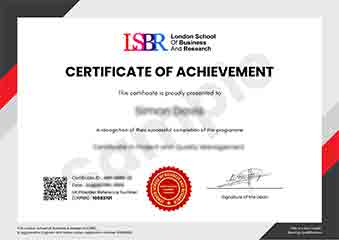
Sample Certificate
Preview the certificate you'll receive upon successful completion of this program.
Get Course Info
Receive the full course guide, pricing details, and enrolment instructions directly in your inbox.
Check your inbox!
Course details have been sent to your email.
Get Your Employer to Sponsor This Programme
Many employers offer professional development budgets. We make it easy for your company to invest in your growth with corporate invoicing and bulk enrolment options.
Email Template for Your Manager
Dear [Manager's Name],
I would like to request sponsorship for the Undergraduate Certificate in Collaborative Document Editing with Google programme offered by LSBR London - Executive Education.
The programme costs $99 (one-time) and can be completed in 3-4 weeks alongside my regular duties.
Key benefits to our team:
- Immediately applicable skills
- Globally recognised certificate
- Corporate invoice available
Best regards,
[Your Name]
What Our Students Say
Hear from our students about their experience with the Undergraduate Certificate in Collaborative Document Editing with Google at LSBR London - Executive Education.
Oliver Davies
United Kingdom"The course content was incredibly thorough, covering everything from basic formatting to advanced collaboration features in Google Docs. Gaining these practical skills has been invaluable for my work, allowing me to streamline my document editing process and collaborate more effectively with team members."
Ashley Rodriguez
United States"This course has been incredibly valuable, equipping me with the skills to collaborate seamlessly in real-world projects, which has significantly enhanced my career prospects in tech and digital marketing."
Zoe Williams
Australia"The course structure is well-organized, providing a clear path from basic Google Docs features to advanced collaborative editing techniques, which has significantly enhanced my ability to work effectively in team environments. The comprehensive content and real-world applications have been invaluable for my professional growth, especially in managing and collaborating on documents with remote teams."
Your Certification Journey
Four simple steps from enrolment to your globally recognised certificate
Enrol Online
Complete your enrolment in under 2 minutes with secure checkout
Start Learning
Get instant access to all course materials and start at your own pace
Complete Modules
Work through the curriculum with expert support available throughout
Get Certified
Receive your LSBR London certificate recognised across 180+ countries
LSBR London by the Numbers
Join a global community of professionals advancing their careers
Students Enrolled
Countries Represented
Average Rating
Career Progression